
Company Profile: Invite an Existing Tester
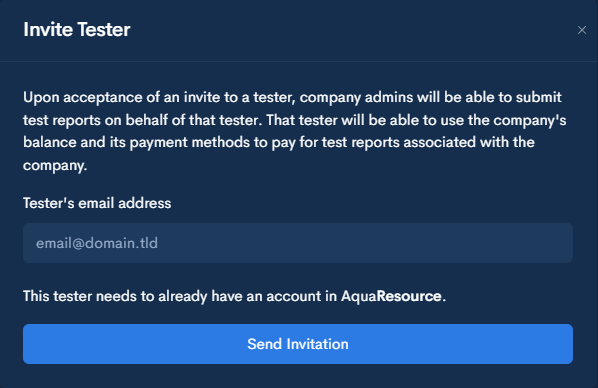
Use this process to request proxy access to a tester who already has an AquaResource account. Once the tester accepts the invitation, your company will be able to submit test reports on their behalf and use company payment methods for associated submissions.
Do not use this process for testers who do not yet have an AquaResource account.
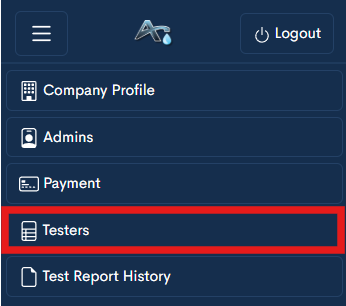
Step 1 — Open the Testers Page
Navigate to the Testers section within your company profile.
Step 2 — Open Invitations
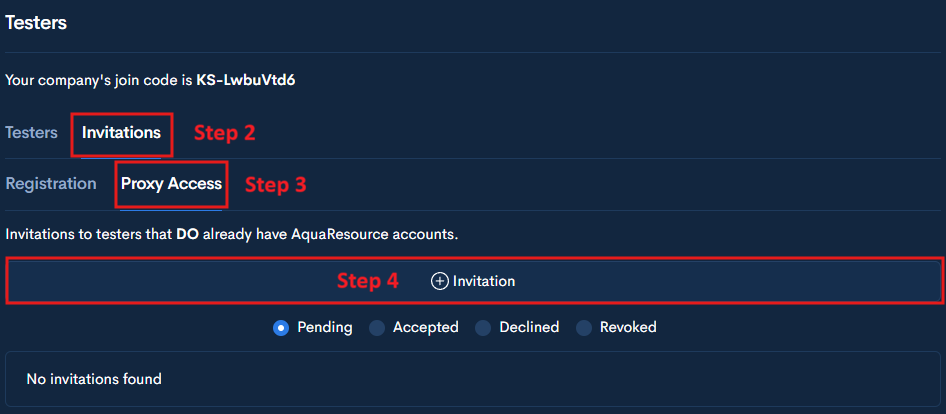
Click the Invitations tab at the top of the page.
This section is used to manage tester invitations.
Step 3 — Select Proxy Access
Under Invitations, select the Proxy Access tab.
Step 4— Click + Invitation
Click the + Invitation button.
This will open the Invite Tester form.
Step 5 — Enter Tester Information
Enter the tester’s email address.
The tester must already have an AquaResource account associated with this email. Do not send an invitation to an email that has not been registered in AquaResource.